I spent too long trying to decide whether Genkit or LangGraph was “better” before realizing that the comparison itself was causing the confusion.
Both can call models, use tools, run multi-step logic, and be part of an agentic application. Put their feature lists side by side and they start to look like competing versions of the same thing.
But that view flattens the architecture. The more useful question is not, “Which framework has more AI features?” It is, “Which part of my system has become difficult enough to need a framework?”
That shift makes the choice much clearer.
The Overlap Is Real
This is not a comparison where one tool builds AI applications and the other builds agents. Genkit describes itself as a framework for AI-powered and agentic applications. Its SDK covers model access, structured output, tool calling, retrieval, workflows, developer tooling, deployment, and monitoring.
LangGraph can also mix ordinary code with model-driven decisions, call tools, stream results, involve a human, and run workflows that are partly deterministic and partly agentic.
So a checklist will produce plenty of ticks in both columns. The difference becomes clearer when we look at their centres of gravity.
Genkit starts with an AI capability that needs to live inside a real application. Its flows wrap AI logic with typed inputs and outputs, streaming, local tracing, testing, deployment paths, and production observability. The official Genkit flow documentation even describes flows as lightweight functions rather than a separate orchestration world.
LangGraph starts closer to the runtime behaviour of a long-running, stateful process. Its official overview calls it a low-level orchestration framework and runtime, with an emphasis on persistence, durable execution, streaming, and human-in-the-loop control.
That is not a hard wall. It is a difference in where each tool asks you to begin.
A Three-Layer Mental Model
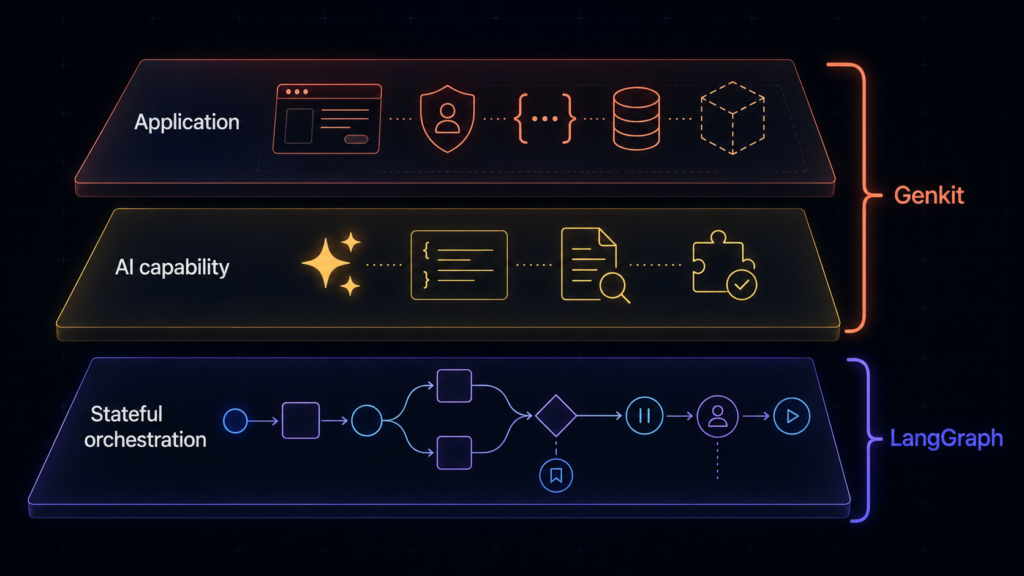
I find it useful to separate an AI system into three layers.
1. The Application
This is the product people use: the interface, authentication, APIs, permissions, storage, deployment, and operational boundaries.
2. The AI Capability
This is the feature powered by models: answer a question, summarize a document, extract structured data, retrieve context, or call an approved tool.
3. The Stateful Orchestration
This controls what happens across steps: which node runs next, what state survives, where execution branches, when a human approves, and how a run resumes.
Genkit has a broad centre of gravity around layers one and two. It helps turn model behaviour into a typed, testable, deployable application capability. Its flows can absolutely contain multi-step logic, but the flow is packaged much like a callable application function.
LangGraph concentrates on layer three. It treats nodes, edges, shared state, checkpoints, interrupts, and resumption as first-class runtime concerns. It does not try to abstract away the architecture of the agent. It gives you the machinery to design that architecture explicitly.
The choice becomes less mysterious when you ask which layer is creating the pain.
| Signal | Start with Genkit | Start with LangGraph |
|---|---|---|
| Hard part | Shipping an AI capability inside an application | Controlling a stateful process over time |
| Primary design unit | Typed flow or callable capability | Graph, state, node, and transition |
| Strong signal | Integration, testing, deployment, observability | Persistence, branching, interruption, resumption |
| Check first | Could a normal function or queue handle it? | Could a small state machine handle it? |
One Support Assistant, Two Starting Points
Consider a fictional customer-support assistant.
A user asks why an invoice changed. The system must verify the user, retrieve account information, find the billing policy, draft an explanation, and show it to a specialist before sending.
From a Genkit starting point, I would first see an application feature:
- define a typed request and response;
- connect the required model and retrieval tools;
- implement the steps inside a flow;
- inspect traces locally;
- expose the flow to the application;
- monitor latency, errors, token use, and execution traces in production.
A deliberately small, synthetic example makes that shape visible:
The code is intentionally incomplete, but the unit of design is clear: a typed capability that the application can call.
That is a natural fit when the route is known and the hard part is delivering the AI capability reliably inside the product. Genkit flows provide typed schemas, streaming, Developer UI integration, and deployment support, while Genkit Monitoring covers production metrics and traces.
Now change the requirement.
The assistant may need to request more evidence, wait for a specialist, resume from the same state, retry one failed branch, or accept a human edit without restarting the whole case.
The difficult part is no longer the model call or the API surface. It is the lifecycle of the process.
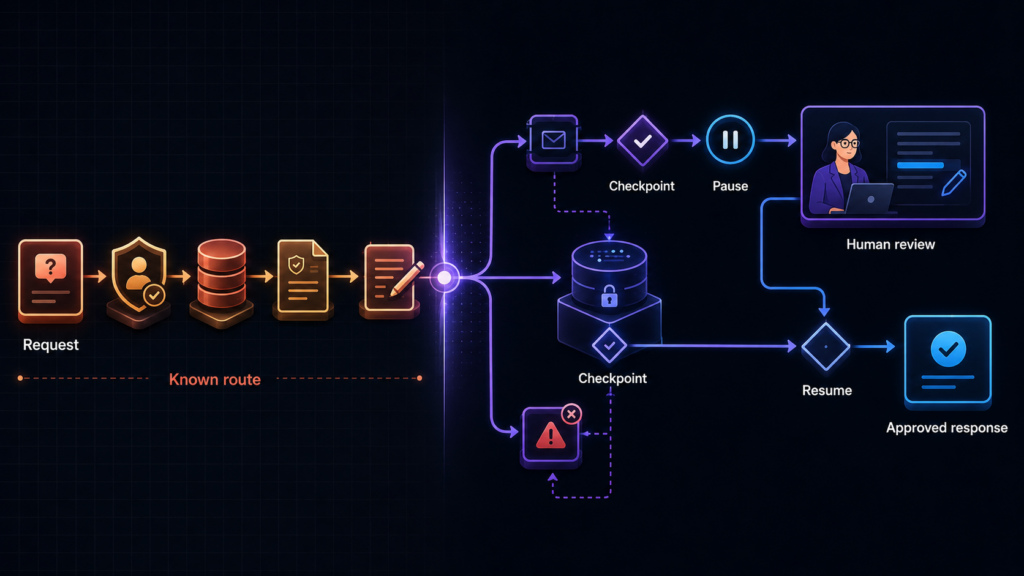
In LangGraph, that pause-and-resume requirement becomes explicit:
from langgraph.checkpoint.memory import InMemorySaver
from langgraph.types import interrupt
def specialist_review(state):
    decision = interrupt({
        "draft": state["draft"],
        "action": "approve_or_edit",
    })
    return {"review": decision}
graph = builder.compile(checkpointer=InMemorySaver())
config = {"configurable": {"thread_id": "case-demo-001"}}
That is where LangGraph’s abstractions become valuable. A checkpointer can preserve thread state. An interrupt can pause execution for external input and resume later. The graph can mix fixed steps with model-selected routes while keeping those transitions visible. LangGraph’s persistence and interrupt documentation treats those behaviours as core runtime features, not extra application code around a model call.
Same assistant. Same models, perhaps. Different source of complexity.
The useful engineering artifact is not a model’s private chain-of-thought. It is the observable context, state transitions, tool calls, checkpoints, and human decisions around the model.
When Genkit Is the Natural Starting Point
Genkit makes sense when I can mostly describe the AI work as a feature:
- “Add grounded answers to this application.”
- “Turn this unstructured input into a validated object.”
- “Build a tool-using assistant behind a typed API.”
- “Test prompts locally, deploy the capability, and monitor it in production.”
It is especially attractive when application integration, model access, schemas, deployment, and observability belong to the same problem. Genkit also supports several languages and deployment targets, so it should not be reduced to “the Firebase option.”
A normal function, a queue, or a small state machine may still be enough for the orchestration. There is no prize for turning every conditional into a graph.
When LangGraph Earns Its Complexity
LangGraph becomes more compelling when control flow itself is the product problem:
- execution may pause and resume much later;
- state must survive failures or human delays;
- different cases take meaningfully different routes;
- humans inspect or modify state mid-run;
- deterministic and agentic steps must coexist visibly;
- the team needs precise control over retries, branching, and completion.
Those requirements create a runtime problem, not merely a prompting problem.
The trade-off is that a low-level orchestration tool asks you to make more architectural decisions. You must define state carefully, understand replay, control side effects, and evaluate more paths. For a short request-response feature, it may be unnecessary machinery.
You Might Use Both — or Neither
These tools do not have to be enemies in an architecture diagram.
A team could use Genkit to implement typed AI capabilities and expose them as application services, while a LangGraph process coordinates a longer-running case that calls those services. Whether that combination is sensible depends on team ownership and operational cost. Two frameworks mean two mental models, two sets of traces, and more integration work.
The opposite answer is equally valid. A direct model SDK plus ordinary application code may be enough. If the route has three fixed steps and one approval, a database record and a job queue may solve the problem more clearly than either framework.
My current decision rule is simple:
If the hard part is building and operating the AI capability, start by looking at Genkit. If the hard part is controlling a stateful process over time, start by looking at LangGraph.
Then prove that the complexity actually exists before adopting both.
“Genkit or LangGraph?” sounds like a tooling question. Most of the time, it is an architecture question wearing a tooling-shaped disguise.
Discover more from Nikhil Emmanuel's Blog
Subscribe to get the latest posts sent to your email.